
Node Profiles in RUNEBond
The Node Profiles feature allows node operators to configure a dedicated profile page for each of their listed nodes on RUNEBond. These profiles serve as a hub for bond providers (BPs), offering critical information and interactive tools to build trust and streamline the bonding process.
Accessible from the URL node-address.runebond.com
What Node Profiles Offer
Section titled “What Node Profiles Offer”Each Node Profile includes:
- Custom Node URL: A unique page where BPs can:
- View real-time node stats
- Request to be whitelisted
- Bond or unbond
- Access the on-chain chat with the operator
- Explore extended node information
- About Section: A short description of the node or operator’s background and mission.
- Unbond Policy: A clearly stated policy that defines how the node handles unbond requests.
- Node Name: A display name for the node, shown across the RUNEBond interface.
- Banner & Logo: Custom visuals to represent the node.
- Mirror Profile: Integration with Mirror – a decentralized publishing platform. Operators can link a Mirror profile to educate, inform, and formalize how the node is managed, with all posts stored on-chain for permanence.
How to Configure a Node Profile
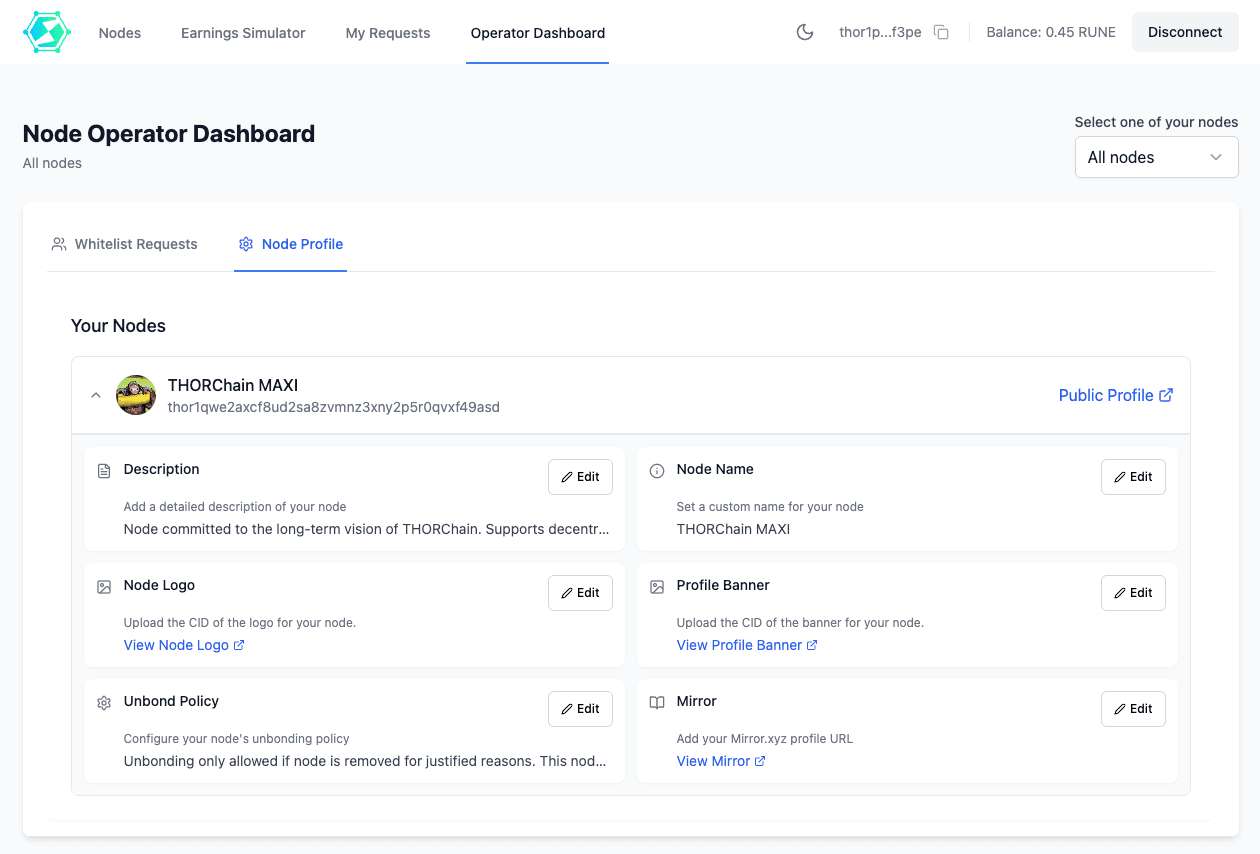
Section titled “How to Configure a Node Profile”Node Profiles are configured through the Node Operator Dashboard. Both node operators and authorized moderators will see a list of all currently listed nodes and can access the settings for each one.
Within the dashboard, operators can:
- Edit the node name
- Write the “about” section
- Define the unbond policy
- Set the Mirror profile URL
- Set the CIDs for logo and banner
Notes on Images (Logo & Banner)
Section titled “Notes on Images (Logo & Banner)”- Logo: square, 512×512 px recommended. Anything up to 1200 px is kept as is; larger images are downscaled. It is always shown as a circle, and non-square images get distorted in some views, so keep it square with the subject centered.
- Banner: 1200×400 px (3:1). Anything wider than 1200 px is downscaled, so larger files only cost upload time. Keep the important content in the center: on phones it is cropped to roughly 1.3:1, and node cards show a thin 80 px strip.
- Formats: PNG, JPG or WebP work best. Any image format is accepted, but animated GIFs lose their animation and SVGs are rasterized.
- Size: under 2 MB is ideal; 25 MB is the hard limit. Images are resized and converted to WebP automatically, so there is no benefit in uploading more.
- How to publish: upload each image to IPFS and paste its CID (Content Identifier) in the node profile settings. Use a CIDv0 (
Qm…) or a base32 CIDv1 (b…). - Images are fetched and cached by RUNEBond the first time someone opens the profile, so a CID that has not propagated yet shows a placeholder until it resolves.
🧰 You can upload your assets to IPFS using tools like: